What Is Cat 6A Network Cable Used For?
Cat 6A network cable is often chosen when a network must carry 10-gigabit Ethernet across a full 100-meter channel. It is common in offices, data centers, hospitals, and classrooms where many devices share busy network links. Think of a ceiling access point streaming video while nearby workstations transfer large files. Cat 6A can provide the capacity those connections need, when the complete cabling channel is correctly designed and installed.
Cabling expert Paul Kish has emphasized a practical point: “The installed channel matters as much as the cable category.” That principle is useful because a Cat 6A label alone cannot guarantee performance. Connectors, patch cords, termination quality, and cable routing all count. Poorly dressed bundles can also make testing and maintenance harder. Small details matter.
Cat 6A is designed to reduce alien crosstalk, an unwanted signal effect that can affect tightly bundled cables. It also supports frequencies up to 500 MHz, compared with 250 MHz for Cat 6. Those specifications make it a practical choice for new 10GbE installations and networks expected to carry heavier traffic over time. Yet it is thicker and less flexible than many lower-category cables. That can complicate crowded pathways, and it may cost more.
The right choice depends on distance, device needs, building layout, and future plans. A qualified cabling professional should verify the design and test the finished links. This guide explains where cat 6a network cable fits, what it does well, and when another option may be more sensible. One detail is easy to overlook: future-proofing has limits. A cable cannot make outdated switches faster.
What Cat 6A Network Cable Is
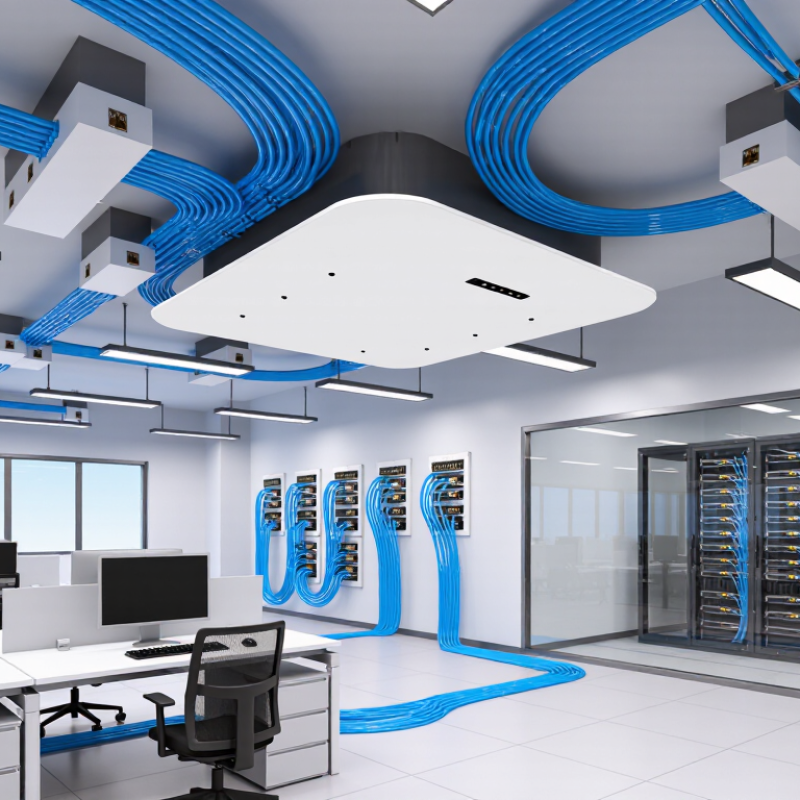
Cat 6A, or Category 6 Augmented, is a copper Ethernet cabling standard designed for high-speed network connections. Inside the cable are four twisted copper pairs, which help reduce electrical interference between signals. Cat 6A supports bandwidth up to 500 MHz and can carry 10-gigabit Ethernet over a channel up to 100 meters when installed to specification. That distance includes the cable run and connected hardware, not just the cable in a box.
Cat 6A cables may be unshielded or shielded; the category alone does not guarantee shielding. Shielded versions can help limit interference in electrically noisy spaces, but they need compatible, properly grounded components.
Many Cat 6A cables use familiar Ethernet connectors, yet the cable is only one part of a reliable link. Jacks, patch panels, installation quality, and testing all matter.
A tight bend behind a desk can cause trouble, even with expensive cable. I have seen that detail overlooked.
Tips: Check the cable markings and rated length before installation. Keep bends gentle, and avoid bundling long runs tightly beside power wiring. When performance matters, have the complete link tested rather than trusting the label alone.
How Cat 6A Carries Data
Cat 6A carries data as balanced electrical signals through four twisted copper pairs. A network interface converts digital bits into carefully timed signal patterns, then sends them across the pairs. The twists help reduce interference between neighboring wires. Receivers measure the patterns and reconstruct the transmitted data. It happens fast.
For 10GBASE-T, the IEEE 802.3an standard specifies transmission at up to 10 gigabits per second over a channel of up to 100 metres. ANSI/TIA-568.2-D specifies Cat 6A performance to 500 MHz. That figure describes signal bandwidth, not internet speed. The cable can support fast local links between switches, servers, and workstations, provided the equipment and installation also meet the required specifications.
Cat 6A’s thicker construction and tighter performance limits help control crosstalk, including interference between adjacent cables. That matters in a busy wiring closet, where bundles may run beside one another. Still, the numbers can mislead: poor terminations, damaged cable, or excessive bend pressure can weaken a link. Certification testing checks whether the installed channel meets key electrical limits. A label alone cannot confirm that.
Common Uses in Homes and Offices
Cat 6A cable is commonly used for wired connections in homes and offices that need dependable, high-speed data transfer. It can support 10-gigabit Ethernet over runs up to 100 meters when the cable and installation meet specifications. In a home, it can connect a router to a desktop computer, network storage, a television, or a wireless access point. Large file transfers feel smoother, and video calls are less likely to compete with other traffic on the same wireless network. It is not magic. Your internet speed still depends on your service and equipment.
In offices, Cat 6A is useful for connecting workstations, switches, printers, and access points, especially where many people share network resources. It can also suit meeting rooms with high-resolution video systems or desks that may need faster connections later. The cable is thicker and less flexible than some lower-category options, so crowded conduits and tight bends need attention. A rushed installation can undermine the benefits. I would not specify it in every room without considering cost, cable routes, and actual network needs.
Tips: Keep cable runs within the rated distance, avoid sharp bends, and label both ends before closing walls or ceiling panels. Ask the installer to test the finished links. Measure twice; repairs are awkward. Consider whether future upgrades justify the extra cable now.
What Is Cat 6A Network Cable Used For? - Common Uses in Homes and Offices
| Use | Typical Location | Why Cat 6A Is Suitable | Practical Notes |
|---|---|---|---|
| 10 Gigabit Ethernet connections | Home offices, business networks, and equipment rooms | Cat 6A is designed to support 10 Gb/s Ethernet over a channel length of up to 100 metres when the installation meets the relevant cabling requirements. | Actual link performance also depends on the network equipment, connectors, installation quality, and channel length. |
| Wired desktop and workstation connections | Offices, study rooms, and shared workspaces | Provides a stable wired connection for computers transferring large files, accessing network storage, or using bandwidth-intensive applications. | Use compatible network ports and patch cords; cabling alone does not increase internet speed beyond the service or equipment limits. |
| Wi-Fi access point backhaul | Ceilings, hallways, and office coverage zones | A fixed Ethernet run can connect access points to network switches and provide a reliable wired uplink. | For Power over Ethernet, confirm that the switch or injector, cable, connectors, and installation are suitable for the required power level. |
| Network-attached storage and server links | Home labs, small businesses, and server rooms | Can support high-speed Ethernet links for moving data between compatible servers, storage devices, and switches. | Both ends must support the intended link speed. Longer or more complex routes should be planned and tested as a complete channel. |
| IP cameras and other PoE devices | Homes, offices, and commercial buildings | One Ethernet cable can carry data and, with compatible PoE equipment, electrical power to devices such as cameras and access points. | Check the device's power requirements and the PoE standard supported by the power source and receiving device. |
| Conference rooms and shared office areas | Meeting rooms, training rooms, and collaboration spaces | Supports wired connections for computers, conferencing equipment, and networked displays where dependable connectivity is needed. | Plan outlet locations and cable pathways before installation; maintain bend radius and avoid excessive pulling force. |
| Structured cabling for future upgrades | New builds, renovations, and office fit-outs | Offers greater bandwidth capability than earlier common twisted-pair categories and can provide headroom for future network upgrades. | Cat 6A cable is generally thicker and less flexible than lower-category cable, so pathways, conduit capacity, and termination space matter. |
Applications in Data Centers and Industrial Networks
Cat 6A network cable is useful when a data center needs dependable 10-gigabit Ethernet over copper. It supports frequencies up to 500 MHz and can carry 10 Gb/s across a channel up to 100 meters when installed correctly. That matters. A server rack may use short links between servers, switches, and patch panels, where copper connections are convenient to terminate and test. Bundled cables still need careful routing; crowded trays can make maintenance harder and restrict airflow.
In industrial networks, Cat 6A can connect control cabinets, machine interfaces, cameras, and monitoring equipment. A shielded cable may help in electrically noisy areas, but proper grounding and separation from power wiring matter too. Not a cure-all. The cable jacket and connectors must also suit the site’s heat, moisture, vibration, and cleaning conditions. Check the full channel, not just the cable marking. A poor termination or excessive bend can undermine performance. Cat 6A is not always the best fit: fiber may make more sense for longer distances, electrical isolation, or dense backbone links. The right choice depends on the layout, environment, and equipment—details that are easy to underestimate.
When Cat 6A Is the Right Choice
Cat 6A is a strong choice when a network needs dependable 10-gigabit connections across long cable runs. The TIA-568.2-D cabling standard specifies Cat 6A performance up to 500 MHz, supporting 10GBASE-T over a 100-meter channel. That makes it useful in offices with busy server links, large file transfers, and several high-resolution video streams. The extra capacity can also help when planning a new building’s cabling for future upgrades.
It fits best where speed, distance, or a long service life matters more than the lowest installation cost. For example, a 70-meter cable run to a network switch may need to carry 10-gigabit traffic without relying on shorter links. Cat 6A is also commonly considered for wireless access points and other powered devices, though the installer should check cable-bundle heat and power requirements. It is thicker than lower-category cable. Tight trays can get crowded.
Tips: Check the full channel length, including patch cords, before choosing. Use properly rated connectors and keep bends gentle; poor termination can undermine the cable’s performance. For short, lightly used links, Cat 6A may be more than the network needs.
Related Posts
-
The Ultimate Guide to Choosing Cat 6a Network Cable for High Speed Internet
-

Top 10 Benefits of Fiber Optic Connections for Businesses?
-

Best Cable Connectors for Reliable Connections Worldwide?
-
What Are the Top China Optic Cable Suppliers?
-
Top Fiber Patch Cord Suppliers for Global Buyers
-
How to Choose the Best Ethernet Cable Tester for Your Needs?