The Ultimate Guide to Choosing Cat 6a Network Cable for High Speed Internet
In today’s fast-paced digital landscape, the demand for high-speed internet has become more pressing than ever. As businesses and homes increasingly rely on online connectivity, the choice of network infrastructure plays a crucial role in delivering the performance required to support streaming, gaming, and large data transfers. Among the various options available, the cat 6a network cable has emerged as a leading solution, offering superior bandwidth capabilities and reduced interference. According to industry reports, deploying cat 6a cables can support speeds of up to 10 Gbps over distances of 100 meters, making it an ideal choice for both residential and commercial applications.
Furthermore, as organizations upgrade their networking equipment, the relevance of high-quality cabling cannot be overstated. The Ethernet Alliance and other telecommunications experts indicate that over 70% of network performance issues can be traced back to inadequate cabling. In light of this, understanding the specifications and benefits of cat 6a network cables is essential for anyone looking to optimize their internet experience. This ultimate guide will explore the critical factors to consider when selecting cat 6a network cables, ensuring you can achieve the high-speed connectivity that today's technology demands.

Understanding Cat 6a Network Cable Specifications and Features
When considering a Cat 6a network cable for high-speed internet, understanding its specifications and features is paramount. Cat 6a cables are designed to support data transfer rates of up to 10 Gbps over distances of 100 meters, making them an ideal choice for intense bandwidth tasks such as online gaming, streaming, and large file transfers. The "a" in Cat 6a stands for "augmented", indicating enhancements over the previous Cat 6 standard. These enhancements include improved shielding, which reduces crosstalk and interference, enabling more stable and reliable connections.
Another critical aspect of Cat 6a cables is their performance at higher frequencies. While standard Cat 6 cables operate at 250 MHz, Cat 6a cables can handle frequencies of up to 500 MHz. This increased capability allows for greater data throughput and reduces latency, ensuring a smoother online experience, especially in environments with multiple connected devices. Additionally, the construction quality of Cat 6a cables typically incorporates thicker insulation and more robust connectors, contributing to their overall durability and efficacy in both residential and commercial settings, where high-speed internet is essential.
The Cat 6a Network Cable Performance Comparison
This chart illustrates the key specifications of Cat 6a network cables, which provide a maximum speed of 10 Gbps, a bandwidth of 500 MHz, a maximum length of 100 meters, and a crosstalk level of 35 dB, making them suitable for high-speed internet applications.
Benefits of Using Cat 6a for High-Speed Internet Connections
Cat 6a network cables are becoming increasingly popular for high-speed internet connections, thanks to their impressive capabilities. Supporting speeds of up to 10 Gbps over distances of up to 100 meters, these cables utilize enhanced shielding that significantly reduces interference and crosstalk. According to the Telecommunications Industry Association, the use of Cat 6a cables can improve network performance by providing a reliable and stable connection essential for activities such as online gaming, 4K streaming, and large file transfers.
One of the primary benefits of using Cat 6a cables is their ability to handle higher frequencies—up to 500 MHz—compared to their predecessors. This increased bandwidth allows for more data to be transmitted simultaneously, which is crucial in today’s data-heavy environments. Furthermore, their backward compatibility with previous generations of Ethernet cables ensures a seamless upgrade path. As more households and businesses transition to high-speed internet, adopting Cat 6a can future-proof your network investment.
**Tip:** When installing Cat 6a cables, ensure they are not tightly bent or sharply angled to maintain optimal performance.
Moreover, the durable construction of Cat 6a cables makes them ideal for both residential and commercial use. They can withstand harsher environments, which is particularly important for installations in industrial settings. The cost-effectiveness of Cat 6a, combined with its advanced performance features, positions it as a top choice for anyone looking to enhance their internet experience.
**Tip:** Always consider investing in high-quality connectors and patch panels designed for Cat 6a to maximize your network's capabilities.
How to Choose the Right Length and Type of Cat 6a Cable
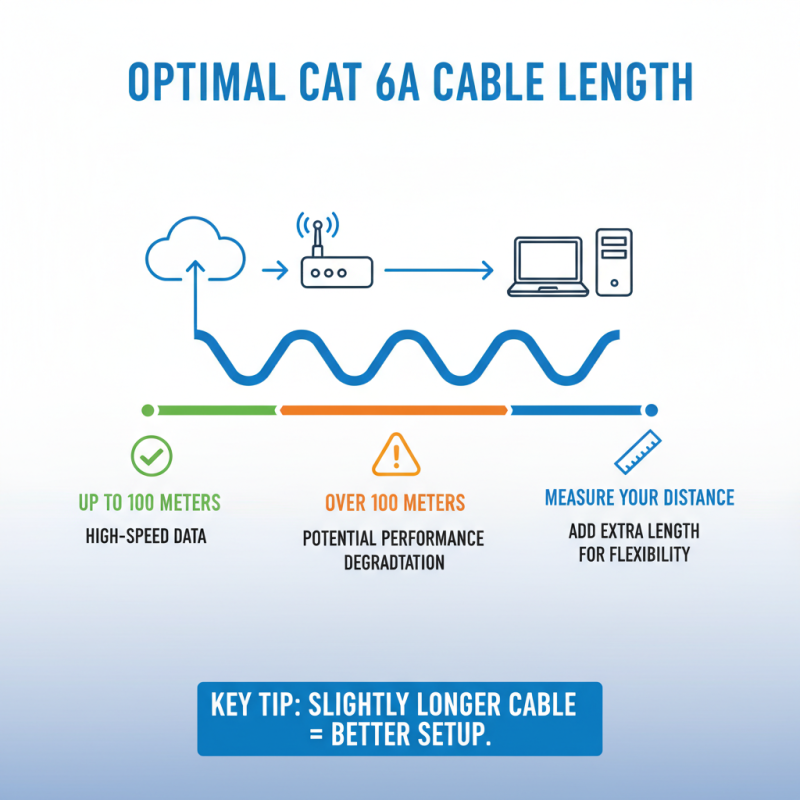
When selecting the right length and type of Cat 6a network cable for high-speed internet, it's essential to consider the distance between your devices. Cat 6a cables can effectively support high-speed data transmission up to 100 meters; however, performance can degrade if the cable is too long for your setup. Measure the distance from your router or switch to your device to determine the optimal cable length. Always opt for a slightly longer cable than needed to provide flexibility in setup and to avoid tension that could damage the cable over time.
In addition to length, the type of Cat 6a cable plays a crucial role in your network's performance. There are two main types: unshielded twisted pair (UTP) and shielded twisted pair (STP). UTP cables are typically sufficient for most home environments where interference is minimal, while STP cables offer added protection against external interference, making them suitable for environments with a higher risk of electromagnetic interference, such as offices or industrial sites. Assess your environment and requirements carefully to choose the appropriate type, ensuring a stable and high-speed connection for all your internet needs.
Installation Tips for Optimal Performance of Cat 6a Network Cables
When installing Cat 6a network cables, proper execution is crucial to ensure optimal performance and high-speed internet. One key tip is to keep the cables away from potential sources of interference, such as electrical wires, fluorescent lighting fixtures, and large appliances. This minimizes signal degradation and helps maintain the integrity of your network connection.
Another important aspect of installation is to avoid bending or kinking the cables sharply. Cat 6a cables have specific bend radius requirements that, if not adhered to, can lead to compromised performance. Ensure that you lay the cables out straight and use cable management solutions, such as clips and ties, to keep them organized without applying excessive pressure.
Lastly, consider the environment where the cables will be installed. For locations with high foot traffic or exposure to moisture, it may be wise to use cables with appropriate ratings for durability and water resistance. This attention to detail will not only enhance the longevity of your network but also contribute to consistent high-speed performance for all your internet needs.
Troubleshooting Common Issues with Cat 6a Network Cables
When it comes to Cat 6a network cables, troubleshooting common issues can save both time and frustration. One prevalent issue is signal degradation, often caused by improper installation or physical damage. According to industry reports, improperly terminated cables can result in a loss of up to 77% of the signal strength, which significantly impacts overall network efficiency. Ensure that connections are secure and check for kinks or cuts along the cable to mitigate these losses.
Another common problem involves interference from external sources. Cat 6a cables are designed to minimize crosstalk and electromagnetic interference, but poor cable management can negate these advantages. Keeping cables organized and away from high-voltage lines is crucial. A study by the Telecommunications Industry Association suggests that maintaining the recommended bend radius and avoiding tight twists can enhance performance by as much as 10% in high-density environments.
**Tips:** Regularly inspect your network cables for visible wear and tear. Invest in a cable tester to verify that signal strength is adequate and there are no faults. If your internet speed consistently falls short of expectations, consider temporarily replacing a suspect cable with a new one to see if performance improves.