
10 Best Fiber Optic Cable Management Solutions?
Reliable fiber optic cable management is not merely a matter of making a rack look tidy. It protects signal performance, reduces service time, and helps technicians trace connections under pressure. In real installations, small mistakes matter. A cable bent too sharply may suffer excessive loss. A crowded patch panel can turn a simple repair into an hour of careful searching.
This guide examines ten practical fiber optic cable management solutions for data centers, enterprise networks, security systems, and telecommunications rooms. The options include horizontal and vertical managers, raceways, slack storage, patch panels, cable trays, bend-radius guides, and labeling systems. Each solution is considered through installation effort, scalability, airflow, maintenance access, and long-term reliability. Standards and manufacturer instructions should guide final decisions, especially when working with high-density single-mode or multimode fiber.
Details matter here. Clear labels, consistent routing, and visible service loops can prevent avoidable downtime. Good management also leaves enough space for future links, although estimating growth is never perfect. Some systems appear efficient during installation but become restrictive after expansion. That weakness deserves attention.
No single solution fits every cabinet or facility. A small wall-mounted enclosure needs different planning from a large hyperscale data hall. The following ten choices compare practical strengths and limitations, helping readers select a cleaner, safer, and more maintainable fiber infrastructure. Expect useful guidance, but not magic. Even the best hardware depends on disciplined installation and regular inspection.
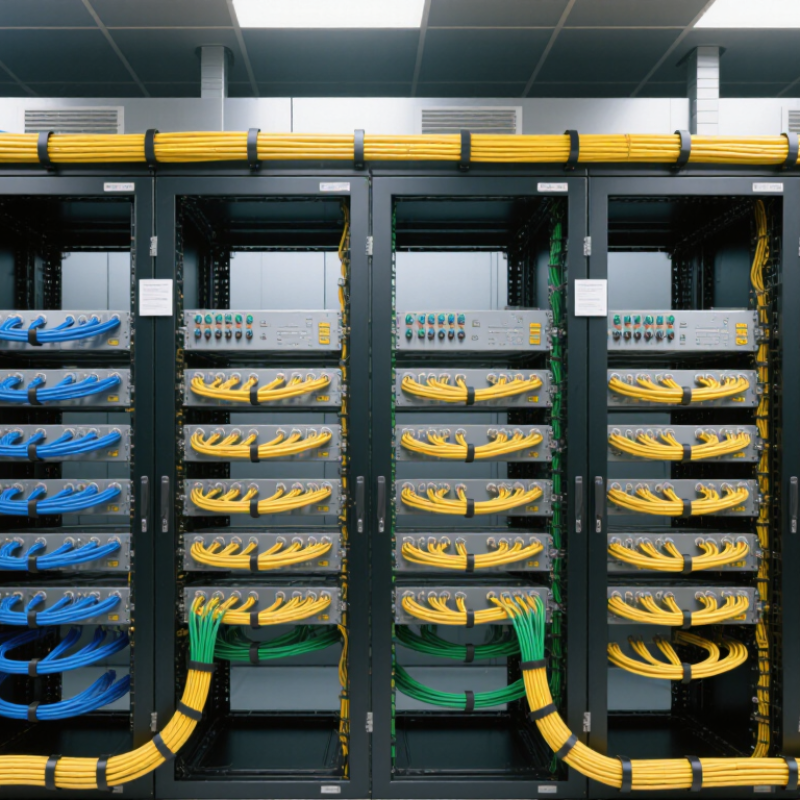
Fiber Optic Cable Management: Purpose, Standards, and Design Principles
Fiber optic cable management protects signal quality, installation safety, and future serviceability. Its purpose extends beyond making a rack look tidy. Proper routing prevents excessive bending, crushing, twisting, and accidental disconnection. Small bends matter. A damaged cable may still pass light today, yet fail during later testing or relocation.
A reliable design follows recognized guidance, including ANSI/TIA-568.3-E for optical fiber cabling and ISO/IEC 14763-2 for installation planning and testing. Connector interfaces should also match applicable IEC 61754 requirements. Always verify the cable manufacturer’s minimum bend radius, because standards do not replace product-specific limits. Use wide-radius guides, secure cables without tight compression, and preserve enough slack for inspection. Label both ends clearly. Separate active pathways from likely maintenance areas, and keep airflow around high-density enclosures unobstructed.
In field inspections, the best systems usually make mistakes visible. Color coding, bend-radius indicators, route maps, and accessible splice trays reduce troubleshooting time. A neat tray can still hide poor polarity control or excessive tension. Nothing stays perfect. Technicians add cables, labels fade, and unused slack shifts under repeated maintenance. Design for those changes, not just the installation day. I would also review the layout after several service visits; some routes that seemed efficient initially become difficult to access. This practical feedback should influence future cabinet spacing, pathway capacity, and documentation.
10 Best Fiber Optic Cable Management Solutions? - Fiber Optic Cable Management: Purpose, Standards, and Design Principles
| No. | Management Solution | Primary Purpose | Recommended Design Practice | Relevant Standard or Guidance | Key Performance Indicator | Typical Use Case |
|---|---|---|---|---|---|---|
| 1 | High-Density Fiber Distribution Panel | Terminates, splices, protects, and organizes a large number of fiber connections in a rack or cabinet. | Use front-access adapters, removable trays, clear port numbering, and adequate slack-storage space. Keep patching zones separate from splice zones. | ANSI/TIA-568.3-E; ISO/IEC 11801-1; IEC 61754 connector-interface requirements. | Port density, insertion loss, accessibility, and labeling accuracy. | Data centers, central offices, and telecom rooms. |
| 2 | Fiber Patch Panel with Splice Tray | Combines cable termination and fusion-splice protection in one enclosure. | Provide bend-controlled routing between the cable entry, splice tray, and adapter panel. Reserve capacity for future fibers without compressing existing cables. | ANSI/TIA-568.3-E; IEC 61753 performance principles; IEC 61300 test methods. | Splice loss, tray capacity, cable retention, and serviceability. | Building entrance facilities and campus distribution rooms. |
| 3 | Overhead Fiber Raceway | Routes fiber cables above racks while keeping pathways visible and separated from power cabling. | Use smooth surfaces, wide-radius turns, properly spaced supports, and a fill level that prevents crushing or excessive congestion. | ANSI/TIA-569-E pathway and space guidance; applicable electrical and building codes. | Cable fill, minimum bend radius, support spacing, and pathway continuity. | Data-center rows and large equipment rooms. |
| 4 | Vertical and Horizontal Slack Managers | Stores service loops and controls patch-cord routing without sharply bending or twisting the fiber. | Choose management rings or channels with smooth edges. Store slack in broad loops and avoid tight figure-eight bends unless specifically permitted by the cable design. | ANSI/TIA-568.3-E bend-radius and cabling-performance principles. | Bend-radius compliance, patch-cord length control, and reduced connector stress. | Rack rows, cross-connect fields, and dense patching areas. |
| 5 | Microduct and Innerduct Routing | Provides protected pathways for blown fiber, micro-cables, or smaller fiber assemblies. | Maintain duct continuity, cap unused openings, control pulling tension, and observe the cable’s maximum pulling tension and minimum bend radius. | ISO/IEC 11801-1; cable manufacturer installation requirements; local pathway codes. | Duct occupancy, pulling tension, installation distance, and protection from contamination. | Campus backbones, access networks, and retrofit pathways. |
| 6 | Underfloor Fiber Trays | Protects and routes cables below raised floors where overhead pathways are unavailable or unsuitable. | Keep trays above water-risk areas when possible, protect cables from sharp edges, and maintain separation from high-temperature or high-voltage sources. | ANSI/TIA-569-E; applicable raised-floor and electrical installation requirements. | Environmental protection, pathway capacity, bend-radius compliance, and access for maintenance. | Server rooms, control rooms, and retrofit installations. |
| 7 | Protective Conduit and Flexible Tubing | Protects exposed fiber from abrasion, crushing, dust, rodents, and accidental handling. | Use smooth internal surfaces, correctly sized conduit, gradual bends, pull strings where needed, and sealed ends in dusty or damp environments. | ANSI/TIA-569-E; IEC 60794 cable construction and environmental considerations. | Mechanical protection, fill ratio, bend radius, and environmental sealing. | Industrial sites, vertical risers, and exposed pathways. |
| 8 | Fiber Raceway with Cover and Divider | Provides a protected, enclosed route and separates different cable groups or service destinations. | Use dividers for different network zones, maintain accessible covers, and avoid overfilling the raceway so cables remain easy to identify and remove. | ANSI/TIA-569-E; facility pathway and firestopping requirements. | Cable segregation, fill percentage, cover accessibility, and route cleanliness. | Secure facilities, healthcare areas, and high-traffic technical spaces. |
| 9 | Modular Cassette and Breakout Management | Organizes multifiber trunks and converts them into structured, easy-to-patch connection interfaces. | Use keyed interfaces, consistent polarity, modular labeling, and strain relief. Keep cassette changes possible without disturbing adjacent circuits. | ANSI/TIA-568.3-E; IEC 61754; IEC 61300 inspection and test methods. | Polarity accuracy, insertion loss, port identification, and change-out time. | Parallel-optics links and high-density data-center connections. |
| 10 | Centralized Labeling and Documentation System | Makes every cable, port, splice, pathway, and service loop traceable throughout its lifecycle. | Use durable labels at both ends, a consistent identifier format, updated pathway drawings, polarity records, and test results linked to each circuit. | ANSI/TIA-606-C administration standard; ANSI/TIA-568.3-E testing and documentation practices. | Traceability, labeling accuracy, mean time to repair, and record completeness. | All structured cabling installations and maintenance programs. |
Related Posts
-
China Top 10 Fiber Optic Cable Management Manufacturers
-

Top Fiber Patch Solutions for Global Buyers in 2026?
-
Top Fiber Patch Cord Suppliers for Global Buyers
-
Top 10 Fiber Patch Cable Suppliers Worldwide
-

7 Essential Tips for Choosing the Best Fiber Optic Termination Kit for Your Projects
-
How to Use Fiber Patch for Enhanced Connectivity and Performance?